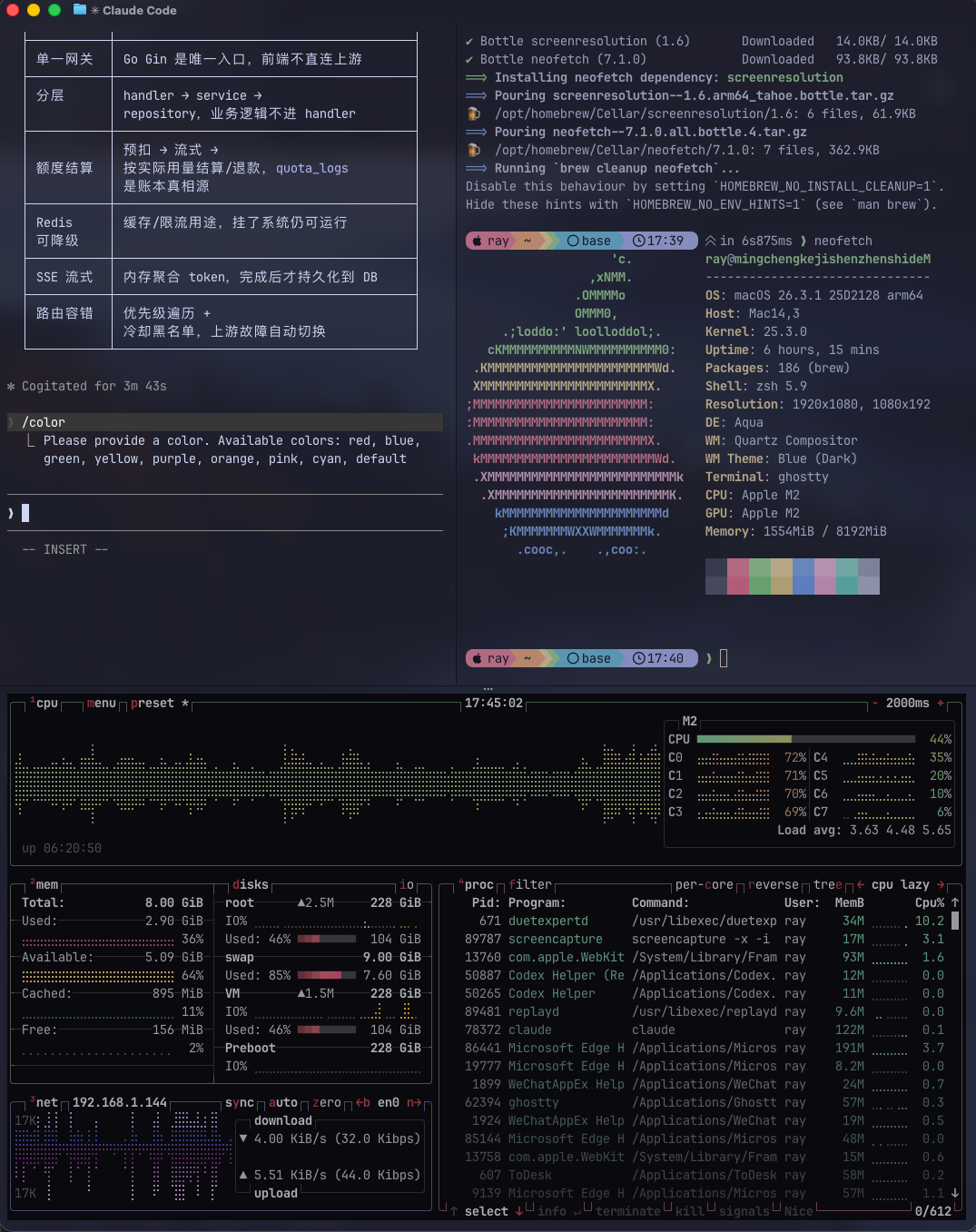
先上图,当前效果
Info
刚换这个 mac 的时候,我用的是原生的 terminal,因为很多 remote 开发任务都是使用 vscode 来进行连接,所以当时找了个不知名教程简单配了下 oh my zsh。
之后 ssh 连接的多了后用了 terminus,对它真的是又爱又恨,功能恰好满足我的需求、外观也基本看习惯了。但是某一次 update 后 由于我没有登录账号也没有购买订阅,本地的所有 ssh 连接保存在里面的全部丢失了。这件事情还发生了不止一次。所以一怒之下找了很久其他开源替代。目前暂时使用 tabby,同时在当时切换 terminal -> iTerm,一个月后的今天,心血来潮试了试 Ghostty,那么按目前来说,效果满意
一键安装
1
| brew install --cask ghostty
|
小工具
1
2
| brew install btop neofetch
brew install starship
|
btop:htop/top 加强版,这个推荐
neofetch:系统信息展示工具,一次性装逼
这俩工具是示例图的右侧和下方的东西
Starship(终端显示 Git、CPU、时间等)
对我来讲略微有点花哨
这里我直接摘抄 树獭非懒 文中的配置,直接一键复制 就是毛玻璃紫色效果
显示已折叠代码(52 行)
 1
 2
 3
 4
 5
 6
 7
 8
 9
10
11
12
13
14
15
16
17
18
19
20
21
22
23
24
25
26
27
28
29
30
31
32
33
34
35
36
37
38
39
40
41
42
43
44
45
46
47
48
49
50
51
52
| # --- Typography ---
font-family = "Maple Mono NF CN"
font-size = 14
adjust-cell-height = 2
# --- Theme and Colors ---
theme = Catppuccin Mocha
# --- Window and Appearance ---
background-opacity = 0.85
background-blur-radius = 30
macos-titlebar-style = transparent
window-padding-x = 10
window-padding-y = 8
window-save-state = always
window-theme = auto
# --- Cursor ---
cursor-style = bar
cursor-style-blink = true
cursor-opacity = 0.8
# --- Mouse ---
mouse-hide-while-typing = true
copy-on-select = clipboard
# --- Quick Terminal ---
quick-terminal-position = top
quick-terminal-screen = mouse
quick-terminal-autohide = true
quick-terminal-animation-duration = 0.15
# --- Security ---
clipboard-paste-protection = true
clipboard-paste-bracketed-safe = true
# --- Shell Integration ---
shell-integration = zsh
# --- Claude 专属优化 ---
# initial-command = /opt/homebrew/bin/claude
initial-window = true
quit-after-last-window-closed = true
notify-on-command-finish = always
# --- Performance ---
scrollback-limit = 25000000
# --- 基础分屏(左右添加屏幕)---
keybind = cmd+d=new_split:right
keybind = cmd+shift+enter=toggle_split_zoom
keybind = cmd+shift+f=toggle_split_zoom
|
ok,到这一步我已知足,日后研究字体相关(等我自己的 mac 到了再折腾)
参考文章
5 分钟打造你的“幽灵搭档”终端-Ghostty Ghostty 是由 HashiCorp 联合创始人 Mitchell - 掘金
Ghostty 折腾小记 - 阿猫的博客
官方开源仓库
GitHub - ghostty-org/ghostty: 👻 Ghostty is a fast, feature-rich, and cross-platform terminal emulator that uses platform-native UI and GPU acceleration. · GitHub
官网
Ghostty